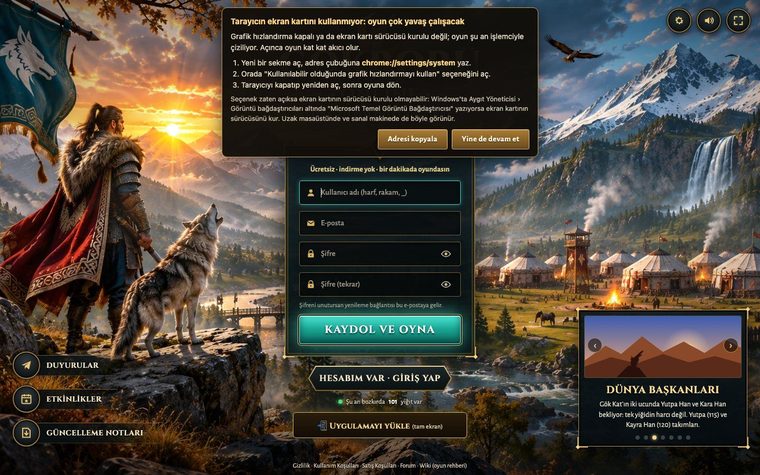
Game client
HTML5 gameplay that runs in desktop and mobile browsers, with the menus, sound, settings and loading screens players expect.
100+ projects delivered and supported
We build HTML5 browser games for studios, founders and brands, from small casual titles to online games with accounts, chat and payments. After the first call you get a written scope and a fixed quote.
Under browser games, these are the parts clients ask for most. A project can use one of them or all.
HTML5 gameplay that runs in desktop and mobile browsers, with the menus, sound, settings and loading screens players expect.
Sign-up, login, saved progress, profiles and friend lists stored on a server, so players can continue on any device.
Real-time chat, parties, guilds and shared game worlds over websockets, with moderation tools for your staff.
An in-game store for items, currency or premium access, connected to a payment provider and keeping full purchase history.
Tools to manage players, bans, events, items and prices without editing code or waiting for a developer.
An installable web app or desktop and mobile wrapper that opens the game full screen with its own icon.
Four steps, with a working test version after each part.
We go through the core loop, genre, target devices and which online features the first version must have.
You get key screen designs, a feature list for version one, a written scope and a fixed quote with a date.
We ship a playable test build after each part so you can play, share it with testers and request changes early.
We deploy the game and server, set up analytics and offer optional monthly care for events, fixes and new content.
From 100+ delivered projects
Products of this kind that we built and still support. Each box opens the live site.
Guide
An HTML5 online game has two halves. The client runs in the browser and draws the game, handles input and plays sound. The server stores accounts and progress, checks that moves are valid and passes messages between players. Single-player casual games can run with a thin server or none at all, while multiplayer titles depend on the server for almost everything.
Around those two halves sit the parts players rarely notice until they fail: login and password reset, a shop that records each purchase, chat filters, player reports and an admin panel for bans and events. Gökbörü Online, our browser MMORPG set in Turkish mythology, needed all of these. Plan them in the first scope so they do not appear later as surprise costs.
Browser games open from a link, so players can try them without visiting a store or waiting for a download. That makes them a good fit for sharing on social media, embedding on game portals and testing an idea with real players quickly. Updates go live for everyone at once, and you avoid store review delays for every small fix.
The trade-off is reach inside app stores and access to some device features. Many teams start with browser game development, then wrap the same code as an installable web app or a store app once the game finds an audience. If you plan that route, tell your developer early so screen sizes, touch controls and payments are built with it in mind.
Write down the core loop in two or three sentences: what the player does every minute, what they earn and why they come back tomorrow. Everything in version one should support that loop. Extra classes, maps and crafting systems can wait until you see how players behave, which saves budget and gets a playable build in front of testers sooner.
Also decide how the game will make money before development starts, because it shapes the design. Premium access, cosmetic items and advertising each need different screens and server logic. Prepare reference games you like, rough art direction and the devices you care about most. A clear brief like this makes quotes from different studios easier to compare.
It depends on the genre, the amount of art and online features such as accounts, chat and payments. We send a written scope and a fixed quote after the first call, and that price holds for the agreed scope.
A small casual game needs far less time than a multiplayer world with a shop and admin tools. The scope includes a target date, and you play a test build after each part.
Yes. After the final payment we hand over the client and server source code, the art and sound files we produced, server access and the accounts created for the game.
We build for the devices you choose. Most HTML5 games can run in mobile browsers with touch controls, and they can also be packaged as an installable web app that opens full screen.
Often yes. We review your current code first, then tell you what can be added on top and what needs rework, with a fixed written quote for the changes.
Guides from our blog on this kind of project.
How to build an MVP app step by step: define one core problem, cut scope hard, choose what to leave out, launch to real users and learn before you spend more.
Hiring and planningHow to write a project brief for an app or website that gets accurate quotes: what to include, what to leave out, and a free brief template you can copy today.
Hiring and planningFreelancer vs agency for app development: the pros and cons of each, where a small studio fits in between, and how to choose for your budget and project.
Send a short brief and get a written, fixed quote. We reply in English, Turkish, Russian or French.